We are all writers. And as writers, we have all faced the blank page. A blinking cursor. A world of possibilities. It should be liberating. But more often than not, it’s paralyzing. When you have the freedom to write anything you want, it’s not clear what you should write. And the result, more often than not, is that you write nothing at all.
Part of the appeal of large language models is that they promise to free us from the blank page.
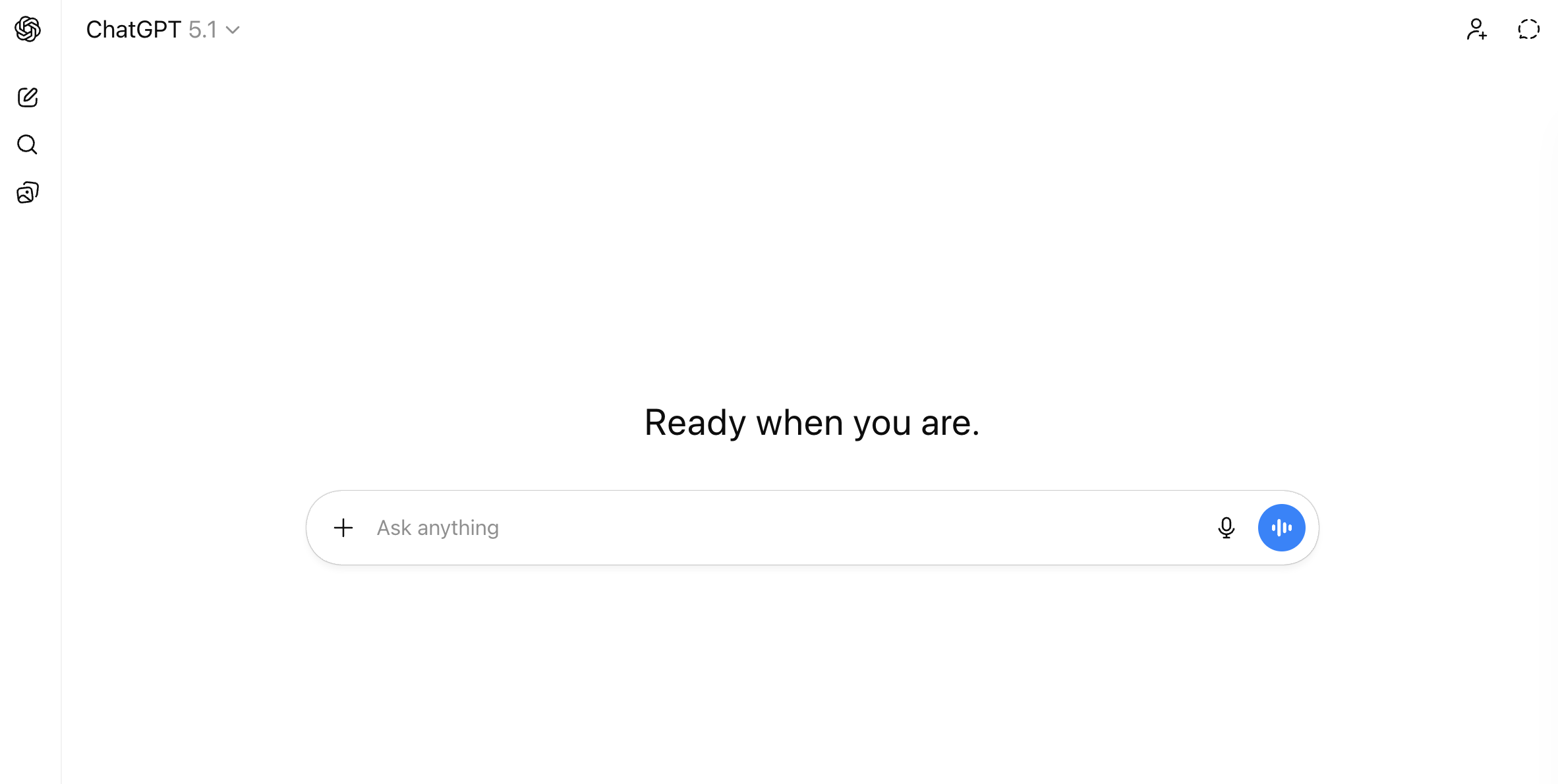
But when you visit ChatGPT.com or claude.ai, you quickly realize you haven’t so much escaped the blank page as traded it for a blank box. The interface literally invites you to “ask anything.”
Anything you want to know, anything you want to create, is there, waiting for you…if only you knew what to ask.
You can type anything and the model will faithfully respond. LLMs, at their core, are predict-the-next-word machines. If you give them a little bit of text, they’ll take it and run. But the obvious asks (outline my paper, write a syllabus, create an essay assignment) yield generic outputs. The result rarely comes close to the vision in your head. And this is where most people say, “AI isn’t very good” and give up.
But the problem, often, isn’t the model. It’s the writer. The prompt was thin. It was lacking context. And no one provided feedback or steering. And like writing, working with these models is a skill, one that can be improved through practice.
In this guide, I cover three foundational skills for working with LLMs: prompting, context, and conversation. These skills are durable (they will still be relevant when the next model is released) and they are model agnostic (they work for ChatGPT, Claude, Gemini, or anything else).
Three Skills
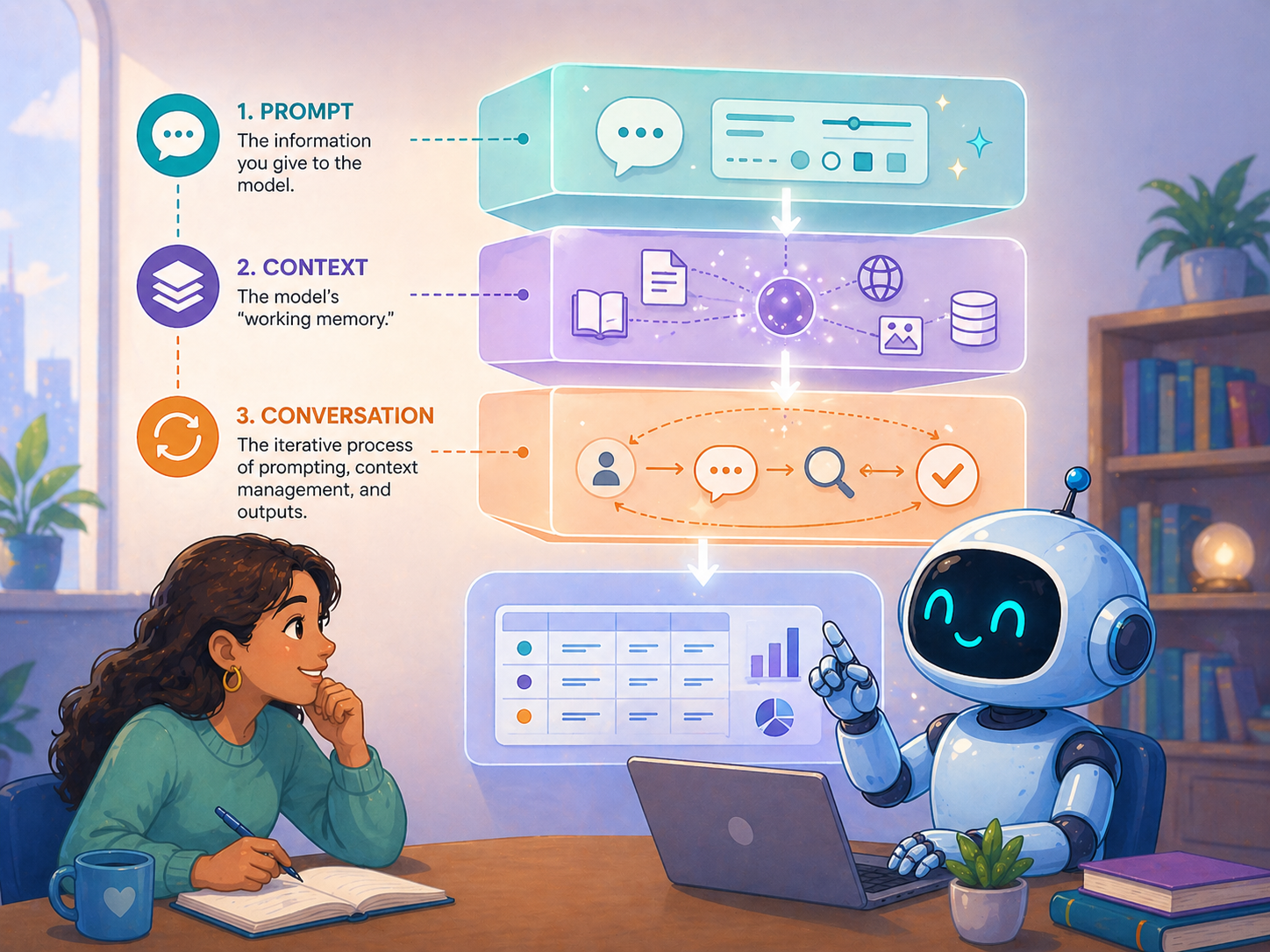
Like any good academic, I want to get my definitions out on the table.
- Prompting is the act of giving the model information. Whatever you type into the box is your prompt. Prompts can be short (“what is the capital of France”), or, as we’ll see, hundreds of words long with detailed instructions, supporting documents, and validation behavior baked in.
- Context is everything the model knows over the course of a conversation. That includes your prompts, the model’s responses, any documents or images you attach, custom instructions you’ve set, and (in newer models) tool use like web searches.
- Conversation is the iterative process of prompting, reviewing outputs, and steering the model toward what you actually want.
Prompting: Your Opening Bid
A prompt is what you type into the chat box: the instructions you give or questions you ask. Every conversation starts with a first prompt, which sets the tone for everything that follows.
The quality of your prompt directly shapes the quality of your output.
Sometimes a simple prompt is enough. “What is the capital of France” gets you “Paris.” End of story. But most of us want to do more than pour out a bottle of water for a fancy Google search. We want help drafting an outline, analyzing data, brainstorming ideas, writing code, summarizing the literature, or even taking actions on our behalf. Those tasks require more thoughtful instructions.
But what makes for “thoughtful instructions?”
Think about working with a teaching assistant or a graduate researcher. Even a strong RA needs clear directions. You wouldn’t hand someone your dataset and say “analyze this.” You wouldn’t hand a TA a stack of exams and say “grade them.” You wouldn’t hand students a blue book and say “write an essay.”
Your syllabus is 20 pages long because you want to give students all the information they’ll need for your course: an introduction to the topic, the schedule and timeline, materials they’ll need, and procedures and policies. These documents take a lot of time and effort to write. And you wouldn’t blame a student for turning in a one page essay when you didn’t specify the page count. You’d blame yourself for unclear directions and update your assignment accordingly.
Yet when working with AI, most people spend a few seconds writing a prompt, get back something disappointing, and conclude that the model is bad at the task. But the model is just trying to do its best to infer your intent and give you what you want. The instructions just weren’t very good.
One task, two prompts
Suppose you want to draft a rubric for a course assignment. Here’s a prompt you might try:
Can you write a rubric for an undergraduate literature review paper?
The model will happily produce a rubric. It’s seen millions of them, so it knows the general shape. But the result will be generic, and you’ll probably feel let down. That’s not a failure of the model. It’s a failure of communication. A graduate TA, given the same instruction, would produce something equally generic, because nothing in the prompt tells them what kind of rubric you want.
Now consider this alternative:
I teach an undergraduate course on the U.S. presidency. I'm assigning a 3-page literature review where students must cite five academic sources on unilateral action and summarize their similarities and differences. I've attached the assignment description I am providing students. Draft a rubric for this assignment. Use a 4-point scale (Exceeds / Meets / Approaching / Below). Include the following criteria: clarity, accuracy, synthesis, writing. Each criterion should have a one-sentence descriptor for every level. Format as a table. Aim for 400-500 words.
This prompt is longer. But it’s also something you could give to a TA and expect a result closer to what you wanted. It provides background about the course, the structure of the assignment (with the student-facing handout itself attached), and asks for a specific kind of rubric: the scale, the criteria, the format, the length.
How did I know to write the second prompt instead of the first? Practice and experimentation, mostly. But that’s a pretty unsatisfying answer. So, here are a few core principles that can help you get from A to B.
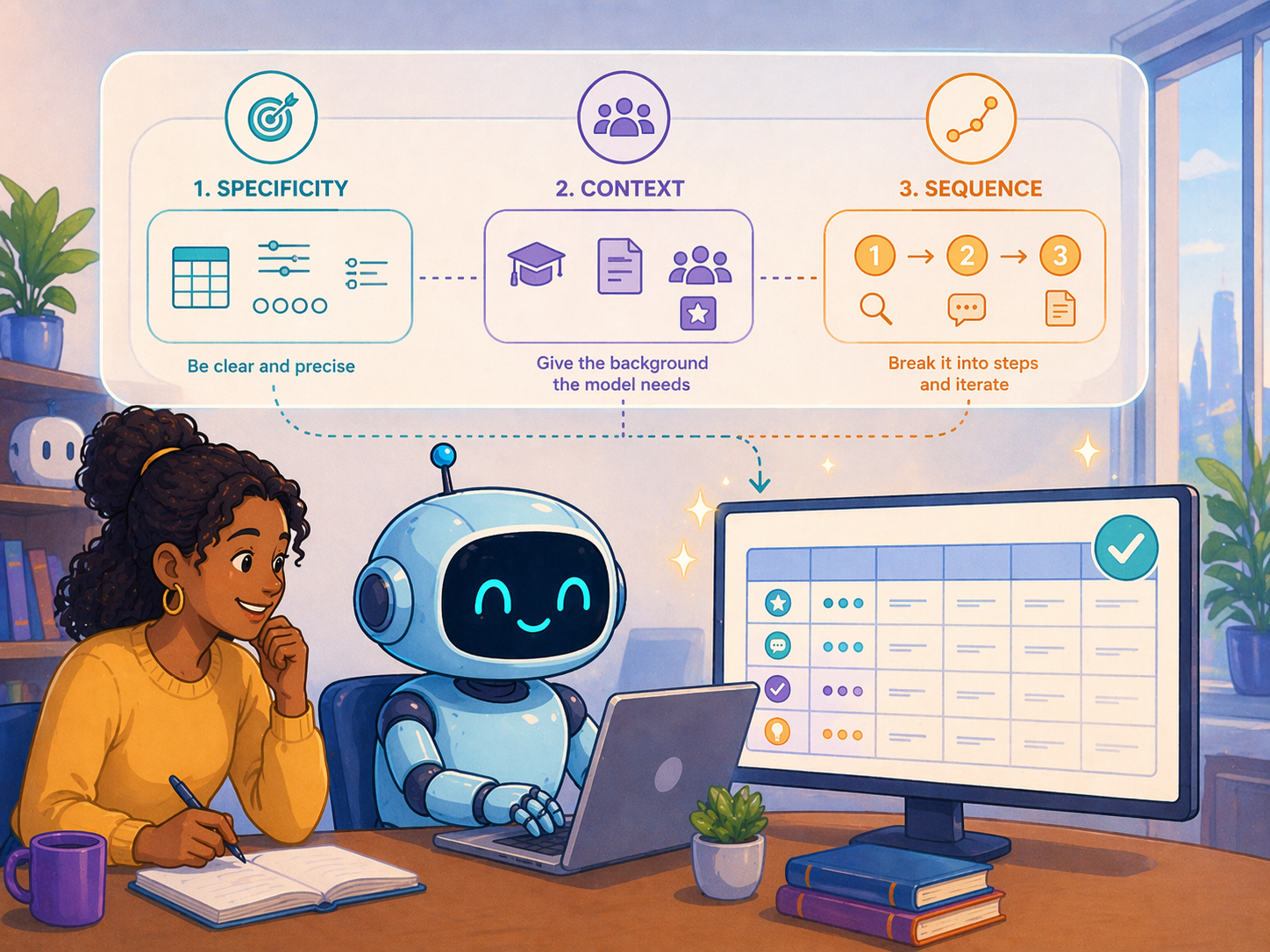
- Be specific. “Write me a rubric” raises a dozen questions the model isn’t going to ask before answering. Should it be holistic or analytic? How many criteria? How long? For what audience? In the absence of specifics, the model wants to be helpful, so it picks the central tendency in its training data, which is rarely what you want. So tell it. Don’t let it guess.
- Provide background. The model is a blank slate at the start of every new chat.1 It doesn’t know what you teach, who your students are, or what stage of the project you’re in. Tell the model about your class. Paste in the assignment handout. Name your audience. State your goals.
- Sequence the work. When you have a compound task (e.g., draft a rubric, create grading guidance for the TA, suggest revisions to the assignment handout), resist the urge to ask for everything at once. Models can tackle complex tasks in a single pass. But sequencing gives you more chances to course correct, especially when parts of the ask build on each other. If you revise the assignment, that has implications for the rubric. By splitting requests, you create natural points to review, redirect, and refine.
You may have heard the term “prompt engineering,” or seen guides full of magic spells: offer the model a tip, threaten it, role-play as a wizard, write in all caps. These are far less important than simply using a skill you already have. When a prompt fails, the fix is almost never some obscure syntax. The fix is “write instructions you’d be willing to hand to a smart graduate student.” If a grad student could complete the task from your prompt, the model can too.
Context: The Model’s Working Memory
If prompting is the instruction you give in a single turn, context is everything the model has access to across the whole conversation. You can think of this like the model’s “working memory.”
Context comes from many places, and it grows over time. There’s a system prompt set by the AI lab itself, telling the model things like “be a helpful assistant” and “give concise responses.” There may be custom instructions you’ve configured (your role, your preferences, your default style). There are the prompts you write, the documents you attach, and even the model’s own previous responses. Newer models can search the web, run code, or call tools. All of that gets folded into the context as the conversation progresses.
Given what I just said about prompting, you might be thinking that more context is always better. Load your prompt with every conceivable detail: the syllabus, all your readings, your CV, and course evaluations from the last three years. The more it knows, the better the answer, right?
Not quite.
Inside the mind of a model
LLMs process information differently than humans, and those differences matter for how you provide context. The analogies that follow (attention, fatigue, memory) are useful ways to think about working with the model. They aren’t literal descriptions of how the architecture works. But the practical implications are real.
| You | The Model | |
|---|---|---|
| Attention | Skim, skip, prioritize | Consumes every token; can’t skim |
| Fatigue | Get tired by exerting effort | Get tired by consuming content |
| Memory | Imperfect but continuous | History persists within a chat, none across chats |
When you read an article, you don’t read it linearly from start to end. You skim. You skip. You prioritize the abstract, the key tables, the conclusion. You ignore page numbers, formatting, acknowledgements, and most of the references. Your eyes literally never land on some pages. You didn’t even know there was an Appendix F. So most of the article never enters your working memory. The model cannot skim. Every token you hand it gets consumed and weighted, including the boilerplate, the references, and yes, even Appendix F. It can’t decide a section is unimportant and look past it. And you can’t tell it to. So irrelevant material isn’t free. It sits in the context window, gets some non-zero weight, and dilutes the response on the part you actually care about.
Models can also experience something like fatigue, although the causes of that fatigue differ between humans and models. You get tired as you work harder. Reading one dense formal theory paper might wear you out. The model is the opposite. The formal theory paper is easy. What degrades the model’s performance is volume. You won’t get tired reading a hundred Dr. Seuss books. But the model will. Because it’s keeping track of every word and every relationship between them so it can predict the next “best” word from the entire conversational history. As the chat grows, outputs get less precise. It’s why a long chat literally feels sluggish in the browser. And it’s why a focused chat tends to produce sharper responses than a sprawling one.
Memory is the third asymmetry. Think about your grad students. You have a sense of what each of them is working on. When they come to your office, you usually need a small reminder about specifics, but the contours are there. The model is different. Within a single chat, the full conversation history is preserved. The model hasn’t forgotten anything you said an hour or a week ago. Across chats, there’s no continuity (with some exceptions for explicit memory features). A new chat is a clean slate. This cuts both ways. Sometimes you want continuity, so you return to an existing chat. Sometimes you want to start fresh because the previous context is no longer relevant or because the chat has gotten too long. That’s a choice you have to make.
Three rules for managing context
These asymmetries suggest three practical rules:
- Be selective. If you want feedback on your abstract, paste the abstract (and perhaps the intro). Don’t upload the full manuscript with appendices and references. The extra material doesn’t help. In fact, it can actively hurt you by diluting the model’s attention.
- Start fresh when performance slows. When responses get worse, or the browser starts to lag, that’s a signal the conversation has grown too long. Ask the model to summarize the key context you’d need to continue, then paste that summary into a new chat. You preserve continuity without dragging the full transcript along.
- Segregate and revisit chats. Treat chats like folders. One chat per project, one chat per task. Don’t have one mega-chat for everything. When you want to return to an earlier line of work, go back to the original chat and pick up where you left off. The model still remembers everything from that conversation, and you don’t have to re-establish context from scratch.
Conversation: Iteration as a Skill
Even with an excellent prompt and well-managed context, the model probably won’t nail the ask on the first try. But note, we casually refer to these tools as “chatbots.” The implication is that we’re supposed to talk to them. And fortunately, we can tell them what they did well, what isn’t working, and how they can do better.
Conversation is the iterative loop where prompting and context work together: you prompt, the model produces, you react, you prompt again. Each turn shapes the next.
Your reaction is data
When the model gives you something that’s a little off, you have some internal reaction. Maybe it’s too long. Maybe the tone is off. Maybe two of the four criteria are good but the others need work.
At this point, people bounce off of the tool. They see a flawed output and conclude that the model just isn’t up to the task. But that reaction is valuable data, and it can help you steer the model on the next conversational turn. Rather than bouncing off, just tell the model what was wrong. What you want instead. “Cut this in half.” “Be more direct.” “Keep the first two criteria, drop the third, and add one for engagement with primary sources.” The model won’t get defensive. It won’t sigh. It’ll probably say “you’re absolutely right” and produce another draft that’s closer to (though probably still not exactly) what you wanted. Then you iterate again.
Models make mistakes
It’s important to note, though, that even with great prompts, context management, and conversational skill, these models make serious mistakes. Not just tone or length issues. They confidently fabricate facts. They make basic arithmetic mistakes. They write code that silently drops one of the five tables you asked for. It’s a real problem.
And unfortunately, there’s no free lunch. The models are powerful. But they aren’t perfect. And they may never be. It’s the nature of working with weird, stochastic technology that we don’t fully understand. So what do we do with that?
Let me start with an analogy to my research using text analysis methods. On my computer, I have a folder that houses every presidential speech given since 1933. About 26,000 documents. Suppose I want to know the major topics presidents have talked about over time. One option: read every speech and hand-code each one. Lots of upfront labor, high confidence in the result. The other option: run an LDA topic model in a few minutes (in fact, Claude can write all the code and run it for me while I write this guide!), then spend my time validating, interpreting, and adjusting the topics. Either way, the work has to happen. The question is whether I do it on the front end or the back end.
LLMs are similar. Delegating a task doesn’t eliminate the work. It moves it. You shift from doing the task manually to validating and refining the output. For many tasks, especially when scale is involved, the back-end work is faster and more pleasant than the front-end alternative. But pretending the back-end work doesn’t exist is the surest way to be disappointed.
That’s one response to the mistakes problem: accept the tradeoff and budget for validation. But there’s a second response. Everything we’ve discussed so far treats AI as an agent that executes tasks for you, where “mistake” means “produced the wrong output.” That framing is one mode of use, but not the only one.
Some of the most valuable uses of these tools are for work where there is no single right answer, and the notion of a “mistake” doesn’t apply.
AI as a Thinking Partner

Writing is thinking.
When you sit down to draft an argument, you often discover the idea you had in your head was only half-formed. The act of writing is the act of clarifying. If we hand off all our writing to AI, we lose that clarifying work. And the output is worse anyway, because the model never knew what you actually wanted to say. But in part, that might be because you didn’t really know what you wanted to say either.
The model can still help. Just not by writing for you. The right prompts turn it into something closer to a thinking partner, one that helps you figure out what you want to say in the first place.
Interview mode
This is my favorite use case. I face the blank page. I have a vague idea of what I want to say. I can’t quite get started. So I ask the model to interview me about the topic, one question at a time, and I just keep responding.
There’s a slightly odd psychology to this. I don’t strictly need the model. I could open a document and start typing. But the model is conversational, and I feel pulled to respond. But more than that, the model is responsive. It asks reasonable next questions. It surfaces gaps in what I’ve said. It probes when I’m vague. It adjusts as my thinking develops. After 30 to 60 minutes of back-and-forth, I’ve generated far more raw thinking than I would have on my own.
When I’m done, I ask the model for an artifact: a summary, an outline, or a transcript. The full conversation is preserved in the chat, so the model can draw on everything we covered to synthesize something I can build from.
I used this approach to develop an entire course on AI last year. There’s no textbook for the topic and no syllabus to crib from. So for each lecture, I asked Claude to interview me. It would start with something like “what’s the key thing you want students to leave with?” and we’d go from there. Maybe for an hour. It would ask follow-ups. It would surface gaps. It would ask how I defined a term or ask for an example. At the end, I’d ask for a structured outline and I’d draft slides from that.
I almost certainly did more work this way than if I’d just asked the model to “write me a lecture on prompting.” But the lecture was in my voice. It hit the points I cared about. It reflected my actual thinking. The interaction was the point. The outline was just documentation.
The same pattern works for the early stages of a paper or grant proposal. You have a sense of the contribution but you can’t quite name it. Paste in your notes, the relevant literature, or a rough abstract, and ask the model to interview you about the argument you want to make. Twenty minutes of back-and-forth often turns a fuzzy intuition into a sharper idea because you’re forced to write through it. Ask for a summary at the end and use it as scaffolding for the draft. You did the thinking. The model just gave you a structured way to surface it.
A few other modes
You aren’t limited to delegation and interview. Three other patterns I use:
- Tutor. “Explain difference-in-differences. I know regression but not causal inference. Start with intuition, then formalism.”2
- Brainstormer. “Give me 10 possible structures for a final project in my methods course. We can narrow from there.”
- Reviewer. “Here is my abstract. What is unclear? Where am I being vague? Be specific and blunt. Imagine you are a hostile second reviewer.”
The model, by default, wants to be a helpful assistant. The labs that build these tools want them to be delegation machines because that’s the most obvious value proposition. But the models are very steerable. The only real limit on how you use them is your imagination.
Takeaways
Three skills, briefly:
- Prompting isn’t a magic spell. It’s clear communication. If you aren’t confident a smart RA could accomplish the task from the prompt, the model probably can’t either.
- Context is about balance. Provide what’s needed. Prune what isn’t. Long chats produce worse outputs than short, focused ones.
- Conversation is iteration. Your reaction to model outputs is the best data you have for improving the next turn.
The models aren’t psychic. They won’t infer what you want from a vague prompt. And they won’t magically clean up after a sprawling conversation. But they are responsive to clear instructions and active steering. Most of the difference between frustrating and useful AI use is on your side of the keyboard.
Sure, you can ask anything. But the first step is getting clear on what you actually want to ask for. And if you aren’t sure…the model can help with that too.
Most major AI tools have memory features and custom instructions that try to carry some information across chats. But these are imperfect. If you start a new chat and say “let’s keep talking about my presidency class,” the model doesn’t really know what you mean. The memory features will get better over time. But for now, don’t rely on them for anything load-bearing. ↩
I tutor 11th-grade math, and I’ve refreshed a fair amount of my own trig with ChatGPT’s help. ↩